
TECH CORNER
06-01-2025
By Max Trenck
KEYBOARD SHORTCUTS
- Ctrl + L on PC or Cmd + L on Mac in your browser to jump straight to the address bar, ready to type or paste.
- Ctrl+W – close an open document or tab, normally without closing the program. In Word, for example, closing the last open document takes you to the File menu.
- Ctrl+Shift+T – opens the last closed tab in a browser. Handy as the undo function rarely works to undo when you have closed a tab by mistake.
- Ctrl+Alt+V – this one you have to activate first in Powertoys, but is incredibly handy. Pastes text from the clipboard without formatting.
- Win+Point – displays the emoji and character selector.
- Win+Shift+S – displays the screenshot tool for screenshots and screen recordings.
- Ctrl+Shift+Esc – opens the Task Manager.
- Win+[number key] – opens the nth program from the left in the Taskbar, for example Ctrl+1 for Explorer if it is on the far left of the shortcuts.
- Win+D – display the desktop.
- Win+Ctrl+Shift+B – restarts the graphics driver, can sometimes save you from a reboot if the screen has gone black or is behaving strangely.
- Ctrl+arrow keys – navigate one word (left/right) or paragraph (up/down) at a time. Combine with Shift to highlight. While you’re at it, you can also learn that Ctrl+Backspace deletes backwards one word at a time and Ctrl+Delete forwards one word at a time.
JUN 2
Microsoft Confirms Password Deletion—Now Just 8 Weeks Away
MAY 31
12 Ways To Maintain Your New Laptop And Extend Its Performance
184 million accounts just leaked, yours could be next
Study links technology use to lower risk of cognitive decline
Using Windows at night? That blue screen glow can hurt your eyes and mess with your sleep. Night Light adds a warm tint that feels gentler as you wind down. Go to Settings > System > Display > Night Light to turn it on. You can also adjust the Strength, and Schedule it to switch on automatically.
MAY 27
iOS 18 Cheat Sheet: All the New Updates and Features on Your iPhone
MAY 25
Hackers are bypassing fingerprint scanners to steal your identity
Support family from afar by controlling their screen with FaceTime
MAY 23
How to remove your personal info from people-search sites
-inside this article is a link to another on how one can get their personal data removed from “public” databases on the web. -Max
Massive data breach exposes 184 million passwords for Google, Microsoft, Facebook, and more
Microsoft Confirms Emergency Update For Windows Users
Why It’s Finally Time For Windows 10 Users To Upgrade To Windows 11
The article just above contains the following text, on how those of us can get one more year of Windows 10 updates for cheap:
For users who can’t afford to buy a brand new PC, or who simply refuse to give up on Windows 10, Microsoft is quietly offering a one year Windows 10 extension, but you’ll have to pay a fee. In what it calls the Extended Security Updates (ESU) program, individual Windows 10 users can gain access to bare bones security updates for a single year. Opting into the ESU program will cost $30 per PC. For organizations and businesses, ESU will cost $61 per-device, and can be purchased for up to three years. However, the cost doubles for each consecutive year. It’s clear that Microsoft is providing the ESU program somewhat begrudgingly, and would much rather its users simply check their PC for Windows 11 compatibility and take the upgrade, which is free for most individual users. -Max
MAY 22
Microsoft Warns Windows Users—Change Browser To Stop Attacks
Google Chrome Users Told To Wait 7 Days For Urgent Security Update
Microsoft Attacks Windows Password Hackers In Global Counter-Strike
Your browser is draining your laptop battery — here’s how to stop it
20 incredibly useful Windows keyboard shortcuts I use every day
MAY 20
FBI Warns iPhone, Android Users—Do Not Reply To These Messages
Ascension healthcare data breach exposes 430,000 patient records
Speaking my language: Reading a website in another language? Chrome can auto-translate as you browse. Open the Chrome menu (three dots) > Settings > Languages > toggle on Use Google Translate. Next time you land on a foreign site, a pop-up will offer to switch it to English. Voilà!
-I use this of a daily basis; it’s great! -Max
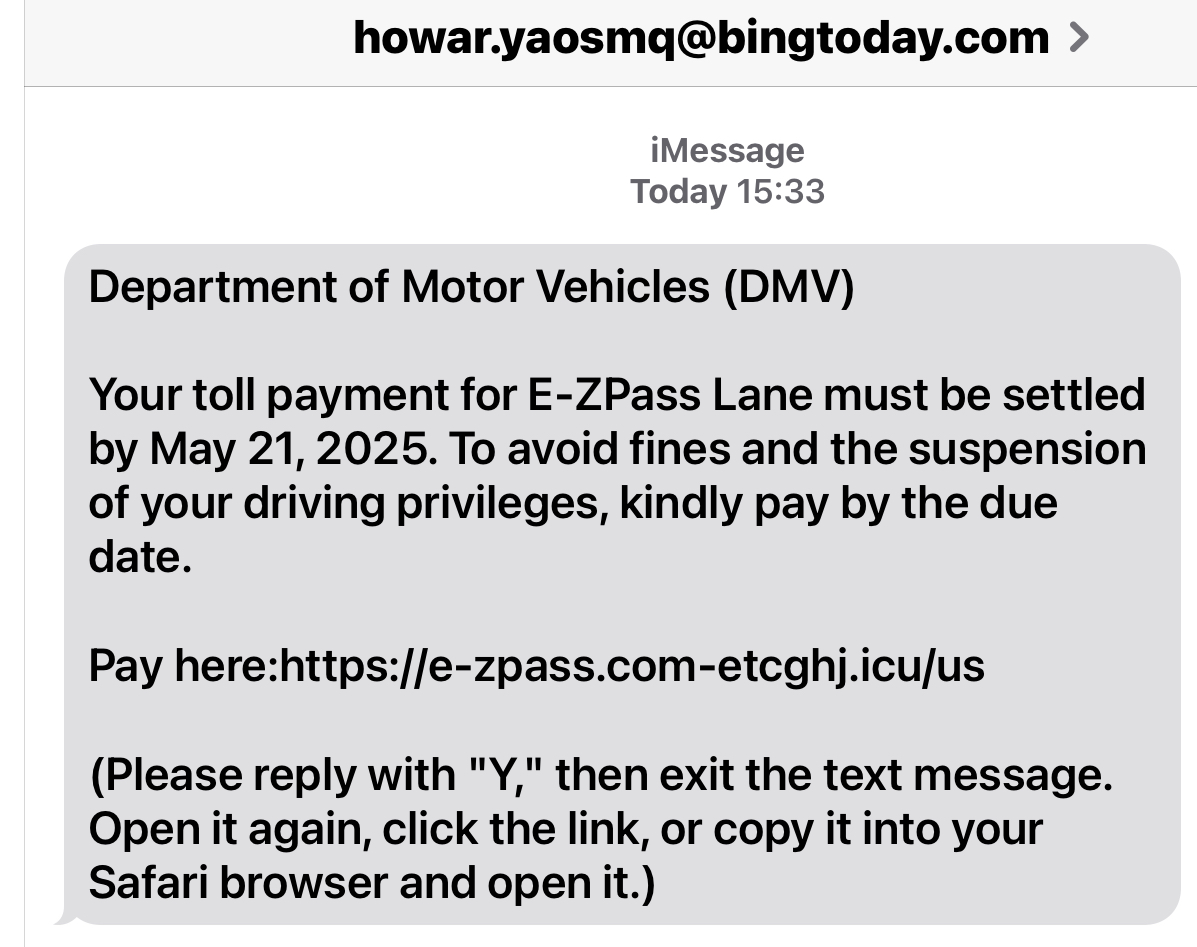
Below is a perfect example of a phishing/smishing text message. Besides that the originating email address is completely unofficial, the recipient is instructed to 1) Reply to the message, 2) Close message, 3) Reopen the message. 4) Copy the link and paste the URL into a browser and open the link that should steal who-knows-what from your device. Now, when one replies to the message, that simple act informs your device that the sender is known to you, and therefore trusted. When the message is closed and reopened, that “text string” will be an active link. This is exactly how this works; so delete the message completely.
Going one step further, type WHOIS into a browser, I did and a GoDaddy website came up. One clickable link was to “WHOIS lookup.” I clicked on that and was prompted to enter a domain name; I entered “icu.us” and pressed Enter. (The registered domain includes the characters preceding the last dot, the dot and what follows the dot to the right; typically we are accustomed to this last part being com, edu, org, mil or one of three others. But, now it can be anything.) What we learn from this is that this domain was registered by Avichy Margalit, who uses the address 40 East Main St., #314, Newark, Delaware, 19711. This person’s email address is majdan19@media.us. He/She registered the domain April 24, 2002, and it expires April 23, 2026. Now, does everyone want to email this person and say “Get a real job!” Just kidding! 😏
MAY 14
Microsoft extends Windows 10 support, but only for Microsoft 365 users
Microsoft Confirms Windows Upgrade Choice—You Must Now Decide
Fake PayPal email let hackers access computer and bank account
MAY 13
FBI Issues Warning For Home Internet Attacks
Google has a solution for those ‘unpaid toll’ text scams
MAY 12
Speed up startup: Is your PC booting up slowly? Too many apps may be launching when you turn it on.
- On Windows: Go to Settings > Apps > Startup to see everything that starts automatically. The higher the “impact,” the more it slows things down. Toggle off the apps you don’t need. It can make a big difference.
- On Mac: Click the Apple menu > System Settings > General > Login Items and Extensions. You’ll see a list of apps that open at startup. Select what you don’t want and click the minus (–) button to remove it. You can also check the Background Items section, that’s where sneaky slowdowns hide.
MAY 11
Microsoft 365 might’ve just given you another excuse to stay on Windows 10 for three more years
MAY 9
How to send high-quality photos from any iPhone
Google Messages finally gets proper unsend functionality with ‘Delete for everyone’
How to Use Your Smartphone to Cope With Hearing Loss
Max says: Apple AirPods 2 on Amazon are $269 regular price. As of this writing, the sale price is $169. During Amazon Days the regular price is likely to be reduced.
Macs under threat from thousands of hacked sites spreading malware — how to stay safe
Your iPhone comes with a built-in white noise machine. Here are 3 more cool things you may not know it can do.
MAY 7
How Hackers Are Breaking Into Apple Devices Through AirPlay
How To Update Your PIN on your Android
Tariffs Are Raising Prices. Here’s How You Can Still Save on Tech
How to Use Split Screen on Android
MAY 6
Turn Off Mail Categories and Change These Other 9 Key Settings in iOS 18.4
iPhone Battery Dying Fast? Turn Off These 3 Settings
I Love This Hidden iPhone Camera Trick for Stunning Long-Exposure Photos